AZTCOFW / TECHNICAL GUIDE
Create a Certificate
A certificate must be created for each user that is going to use the VPN system. In Descriptive and Common Name, enter the username the user uses to log on to Active Directory. Strictly speaking Descriptive name can be anything but usernames should be unique anyway.
Go to System > Cert Manager (not User Manager!), Certificates tab and click+
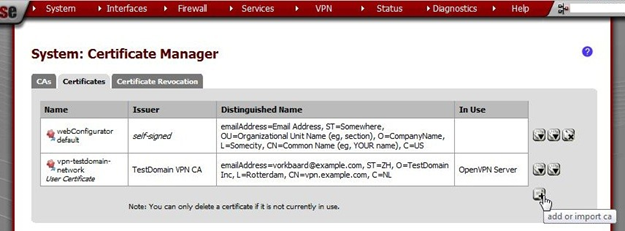
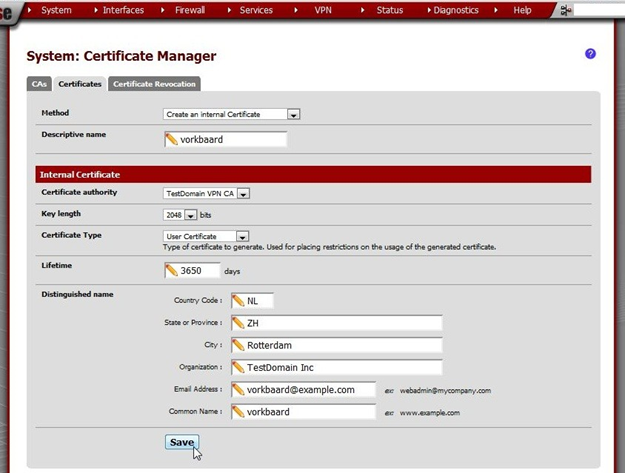
Enter these values:
| Method | Create an internal Certificate |
| Descriptive name | [Username of the user that will be using the vpn connection] In some cases this is case sensitive. I tend to stick to all lowercase for that reason. It doesn’t really matter but keep it in mind if the connection can’t be established. |
| Certificate authority | TestDomain VPN CA |
| Key length | 2048 |
| Certificate Type | User Certificate |
| Lifetime | 3650 days Unless the user has a temporary account. |
| Distinguished name | Fill out the preferences here. |
| Common Name: | [see Descriptive name] |
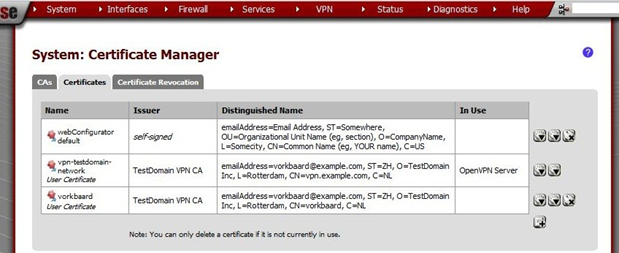
Note the entry in the Certificate list.
[Image unavailable in the source]
Archive imported from the AZTCOFW knowledge base on 2026-09-05. Historical source records may refer to older software versions. Confirm applicability before changing a production system.
Original source ↗