AZTCOFW / TECHNICAL GUIDE
OpenVPN Site-to-Site Configuration Example with Shared Key
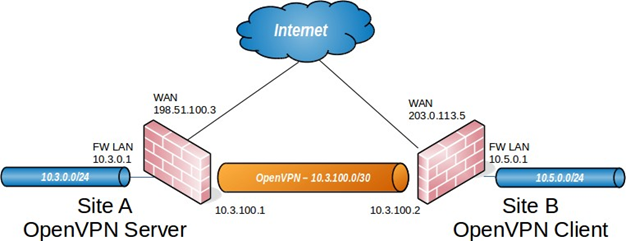
This section describes the process of configuring a site-to-site connection using a shared key style OpenVPN tunnel.
When configuring a shared key site-to-site OpenVPN connection one firewall will be the server and the other will be the client. Usually the main location will be the server side and the remote offices will act as clients, though the opposite is
functionally equivalent. Similar to a remote access OpenVPN configuration there will be a dedicated subnet in use for the OpenVPN interconnection between networks in addition to the subnets on both ends. The example configuration described here is depicted in Figure OpenVPN Example Site-to-Site Network.
10.3.100.0/30 is used as the Tunnel Network. The OpenVPN tunnel between the two firewalls gets an IP address on each end out of that subnet, as illustrated in the diagram. The following sections describe how to configure the server and client sides of the connection.
Archive imported from the AZTCOFW knowledge base on 2026-09-05. Historical source records may refer to older software versions. Confirm applicability before changing a production system.
Original source ↗