AZTCOFW / TECHNICAL GUIDE
Penalty Box
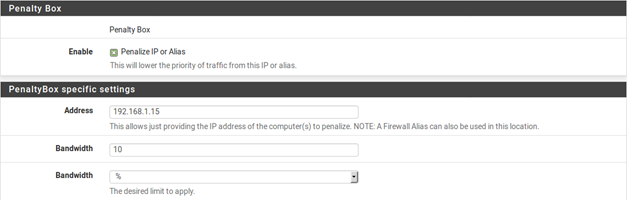
The penalty box, depicted in Figure 109: Penalty Box, is a place to relegate misbehaving users or devices that would otherwise consume undesirable amounts of bandwidth. These devices are assigned a hard bandwidth cap which they cannot exceed.
Enable A checkbox to enable the Penalty Box settings on this step. When unchecked, the options are disabled and these queues and rules will not be added by the wizard.
Address The IP address to penalize, or an alias containing multiple addresses to penalize.
Bandwidth The amount of bandwidth that Address can consume, at most.
To use these options:
- Check Penalize IP or Alias
- Enter an IP address or Alias in the Address box
- Enter the Bandwidth limit
- Choose the correct units for the Bandwidth limit
- Click Next to proceed with the next step
Archive imported from the AZTCOFW knowledge base on 2026-09-05. Historical source records may refer to older software versions. Confirm applicability before changing a production system.
Original source ↗