AZTCOFW / TECHNICAL GUIDE
Allow IPsec traffic through the firewall
The tunnel should now be operational however no traffic is allowed through it until a firewall rule is added to pass it. The rule must be added to the routers at both sites.
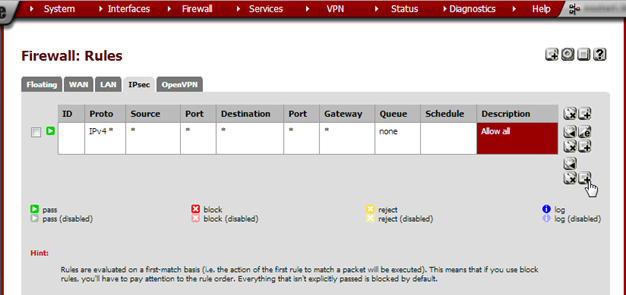
From the Firewall menu, choose Rules. Go to the IPsec tab and click +[Image unavailable in the source].
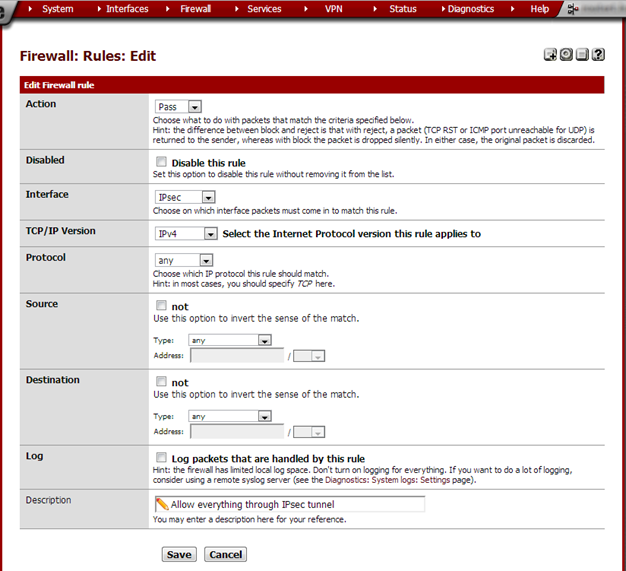
Set the Protocol to any and in the Description field type Allow everything through IPsec tunnel. Click Save and on the next page click Apply changes. Do this on both routers.
At this point the tunnel should be up and it should be possible to ping from one side to the other and back. Computers in Site A haven’t got an Internet connection however. This is because we still need to configure NAT for the IPsec tunnel.
Archive imported from the AZTCOFW knowledge base on 2026-09-05. Historical source records may refer to older software versions. Confirm applicability before changing a production system.
Original source ↗