AZTCOFW / TECHNICAL GUIDE
AZTCO-FW-initiated Traffic and IPsec
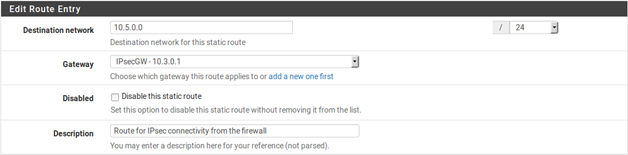
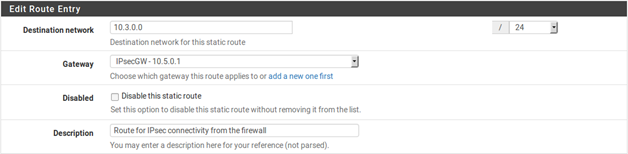
To access the remote end of IPsec connections from the AZTCO-FW firewall itself, “fake” the system out by adding a static route pointing the remote network to the LAN IP address of the AZTCO-FW firewall. Note this example presumes the VPN is connecting the LAN interface on both sides. If the IPsec connection is connecting an OPT interface, replace Interface and IP address of the interface accordingly. Because of the way IPsec is tied into the FreeBSD kernel, without the static route the traffic will follow the system routing table, which will likely send this traffic out the WAN interface rather than over the IPsec tunnel. Take Figure 56: Site-to-Site IPsec, for example.

A static route is required on each firewall, which is done by first adding a gateway pointing to the LAN IP address of
the firewall , and then adding a static route using this gateway . Figure 57: Site A Static Route to Remote Subnet show the route to be added on each side.
Archive imported from the AZTCOFW knowledge base on 2026-09-05. Historical source records may refer to older software versions. Confirm applicability before changing a production system.
Original source ↗