AZTCOFW / TECHNICAL GUIDE
Before Starting The Wizard
Before starting the wizard to configure the Remote Access Server, there are some details that must be planned.
Determine an IP addressing scheme
An IP subnet must be chosen for use by the OpenVPN clients themselves. This is the subnet filled in under Tunnel Network in the server configuration. Connected clients will receive an IP address within this subnet, and the server end of the connection also receives an IP address used by the client as its gateway for networks on the server side.
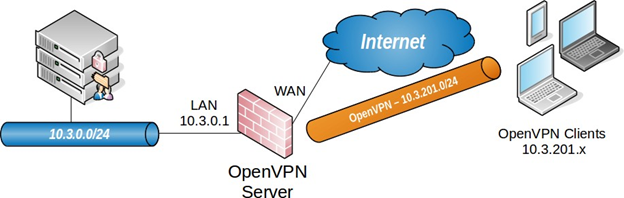
As always when choosing internal subnets for a single location, ideally the chosen subnet will be designed so that it can be CIDR summarized with other internal subnets. The example network depicted here uses 10.3.0.0/24 for LAN, and 10.3.201.0/24 for OpenVPN. These two networks can be summarized with 10.3.0.0/16, making routing easier to manage.
Example Network
Figure 69: OpenVPN Example Remote Access Network shows the network configured in this example.
Archive imported from the AZTCOFW knowledge base on 2026-09-05. Historical source records may refer to older software versions. Confirm applicability before changing a production system.
Original source ↗