AZTCOFW / TECHNICAL GUIDE
Starting the Wizard
Each wizard name is followed by the filename of the wizard, which is a link. Click the link to start the wizard. This example uses the Multiple LAN/WAN wizard, so click traffic_shaper_wizard_multi_all.xml.
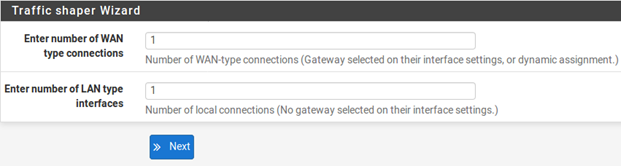
Next, the wizard starts and the first step prompts for the number of WAN and LAN type connections on the firewall, as in Figure 106: Entering the Interface Count.
- Enter the number of WAN-type connections on the firewall. These are connections with a gateway configured on the interface, or dynamic WAN type interfaces such as DHCP or PPPoE
- Enter the number of LAN type connections. These are local network interfaces without a gateway on the interface
- Click Next to proceed with the next step
In this example the firewall only has one WAN and one LAN interface.
Archive imported from the AZTCOFW knowledge base on 2026-09-05. Historical source records may refer to older software versions. Confirm applicability before changing a production system.
Original source ↗