AZTCOFW / TECHNICAL GUIDE
Enable DNS over TLS for Forwarded Queries
Next, configure the DNS Resolver to use DNS over TLS for outgoing queries.
- Navigate to Services > DNS ResolverUncheck Enable DNSSEC Support
Note: DNSSEC is not generally compatible with forwarding mode, with or without DNS over TLS.
- Check Enable Forwarding Mode
• Check Use SSL/TLS for outgoing DNS Queries to Forwarding Servers
- Click SaveClick Apply Changes
Use Example DNS Resolver configuration for outgoing DNS over TLS as a reference for the settings on this page.
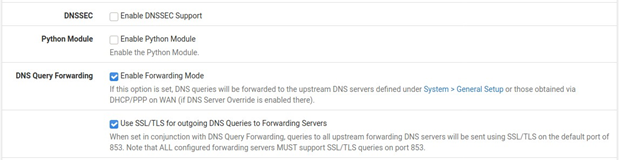
Fig. 2: Example DNS Resolver configuration for outgoing DNS over TLS
The DNS Resolver will now send queries to all upstream forwarding DNS servers using SSL/TLS on the default port of 853
Archive imported from the AZTCOFW knowledge base on 2026-09-05. Historical source records may refer to older software versions. Confirm applicability before changing a production system.
Original source ↗