AZTCOFW / TECHNICAL GUIDE
Enable DNS over TLS Server (optional)
The DNS Resolver can also act as a DNS over TLS server, though it does not affect outbound/forwarded queries, so this section is optional.
Only enable this feature if local clients must talk to the DNS Resolver using DNS over TLS queries.
- Navigate to Services > DNS Resolver
• Check Respond to incoming SSL/TLS queries from local clients
- Select a valid server certificate in SSL/TLS Certificate
- Leave SSL/TLS Listen Port at the default (empty or 853)
- Click Save
- Click Apply Changes
Use Example DNS Resolver configuration for acting as a DNS over TLS Server as a reference for the settings on this page.
Now the DNS Resolver will listen for DNS over TLS queries from local clients on port 853.
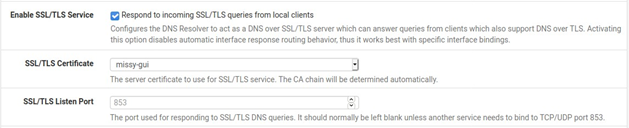
Fig. 4: Example DNS Resolver configuration for acting as a DNS over TLS Server
Archive imported from the AZTCOFW knowledge base on 2026-09-05. Historical source records may refer to older software versions. Confirm applicability before changing a production system.
Original source ↗