AZTCOFW / TECHNICAL GUIDE
Firewall Rule Configuration
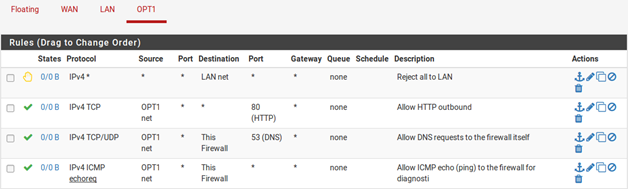
The NAT and IP address configuration is now complete. Firewall rules will need to be added to permit outbound and inbound traffic. Figure 90: OPT1 Firewall Rules shows a DMZ-like configuration, where all traffic destined for the LAN subnet is rejected, DNS and pings to the OPT1 interface IP address are permitted, and HTTP is allowed outbound.
To allow traffic from the Internet to the public IP addresses on an internal interface, add rules on the WAN using the public IP addresses as the Destination. Figure 91: WAN Firewall Rules shows a rule that allows HTTP to 192.0.2.130, one of the public IP addresses on the internal interface.
After configuring the firewall rules as desired, the setup is complete.
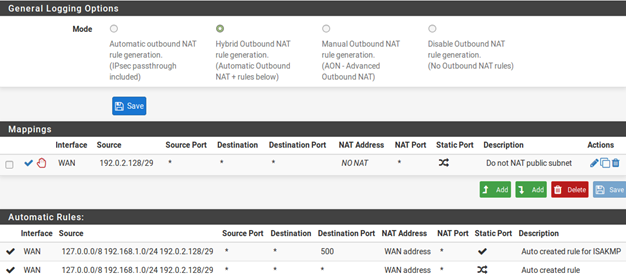

Note: Traffic will flow from LAN to this public subnet by default without NAT. If this behavior is not desired, adjust the LAN firewall and NAT rules accordingly. Additionally, policy routing may need to be bypassed to allow from LAN to this interface.
Archive imported from the AZTCOFW knowledge base on 2026-09-05. Historical source records may refer to older software versions. Confirm applicability before changing a production system.
Original source ↗