AZTCOFW / TECHNICAL GUIDE
Method 1: NAT Reflection
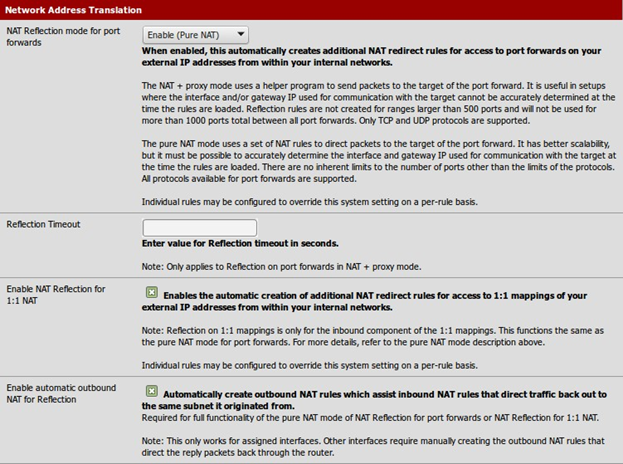
In order to access ports forwarded on the WAN interface from internal networks, NAT reflection must be enabled.
In order to do this, navigate to System > Advanced, Firewall/NAT tab. On that page, select Pure NAT for NAT Reflection mode for port forwards, check Enable NAT Reflection for 1:1 NAT, and check Enable automatic outbound NAT for Reflection. Click Save.
Pure NAT mode for port forward reflections uses only pf NAT rules to accomplish reflection without any external daemons. It will work with TCP, UDP, and other protocols.
NAT+Proxy mode for port forward reflection sets up a proxy daemon and rules to receive and reflect only TCP con- nections. This method the only available means of reflection in earlier versions of AZTCO-FW software. It can work in
certain rare circumstances where Pure NAT mode does not. This will only work with single port forwards or ranges of less than 500 ports. It does not work with UDP or other protocols.
Archive imported from the AZTCOFW knowledge base on 2026-09-05. Historical source records may refer to older software versions. Confirm applicability before changing a production system.
Original source ↗